Deck for hiring managers
Portfolio Resume LinkedIn

David Paterni

AI Product DesignerLos Altos, CA, remote

The short version, for hiring managers.

I decide what an AI product should do on its own, where it has to stop and ask, and how to tell it is working. Then I build it.

  • 6products live, designed and built on my own
  • 2on the App Store, for iPhone and Apple Watch
  • 3AI products where a person can check the AI: Allowance, Watchtower and Criterion

How I work

What I do best

My path

The last four years

Three and a half years at Anywhere Real Estate, then my own consultancy.

  1. Before 2022

    Senior design roles

    First designer at StatMuse and Meltwater, founding designer at The Huffington Post, then Altia and ForeSee.

  2. 2022

    Contract Product Designer

    Randstad, placed at Anywhere Real Estate

  3. Oct 2024

    Senior Product Designer

    Anywhere Real Estate, hired full time

  4. Dec 2025 to now

    AI Product Designer

    Proof Practice, client apps and my own products

At Anywhere

  • Property search
  • Estately
  • Denali
  • BOSS
  • Design system
  • AI scheduling
  • Agent onboarding

The company behind Coldwell Banker, Century 21 and Sotheby's International Realty.

The work

Pick a project

My own products first, then three and a half years at Anywhere Real Estate.

Dec 2025 to now

Proof Practice

2022 to Dec 2025

Anywhere Real Estate

AllowanceAn agent that pays the bills1/3The situation

Most vendor bills are routine, yet someone approves each one to catch the rare fraud.

Role
Research, design and build, phone and desktop
Built with
Kinetic, my banking design system
Runs on
iPhone, Apple Watch, the watch face and the lock screen
Setting the agent's limits

Fraud

New bank details

A hijacked vendor email pays a new account.

Mistake

The same bill twice

A repeat bill, or far above the usual.

Fatigue

Twenty in a row

People stop reading after twenty approvals.

Allowance2/3What I did

An agent that pays the routine bills and stops on the risky ones.

  • Pays only when every check passes, and says why.
  • New bank details, a new vendor or an odd amount always stop.
  • New bank details go to the owner.
  • Every payment lists the checks it passed.
New bank details, so it stops
Every payment says why

Allowance3/3What changed

No results yet. Allowance has not been released or tested with users.

A day to stop it

Payments wait until 9:00 AM the next business day. Anyone can stop one.

What success means

No payment reaches a criminal. 9 in 10 wrong payments stopped.

What I would test first

Whether people catch a duplicate that passes every check.

Read the Allowance case study

Stop it before 9:00 AM

WatchtowerSupervising AI voice agents on calls1/3The situation

AI voice agents now take real actions on calls, and most tools only offer a button to take over.

Role
I designed and built the product, the screens and the code
Status
A concept with a working demo. Not tested with users

A takeover button tells you a person can step in. It doesn't tell you when.

Watchtower, call console
Visit notes, asked for by a caller who is not verified

Watchtower2/3What I did

One person supervises many agents and steps in only when an agent reaches its limits.

  • Inside its limits the agent acts on its own. At a limit, that one action pauses.
  • The supervisor can approve, edit, hold or take over. An override needs a reason and is logged.
  • If no one answers in time, the action is stopped, never approved.
  • When the caller withdraws consent there is no approve button, even for a person who takes over.
Watchtower, call console
Consent withdrawn mid call, so nobody can approve the disclosure

Watchtower3/3What changed

No results yet. Watchtower has not been tested with users.

What success means

Agents trusted with more sensitive actions, fewer costly mistakes, more agents per supervisor.

What I would test first

Whether one decision at a time holds when three calls need you at once.

Read the Watchtower case study

Watchtower, call console
A weak link to the agent turns off approve and edit

KineticA banking app design system1/2What it is

A banking app design system, with motion built in from the start.

Role
I designed the system and built every part of it
Scale
119 tokens, 17 component groups, 15 blocks and 15 screen types
Status
Live, as one working phone app
Kinetic's project card

Tokens

Set once, used everywhere

119 tokens from ten color scales, light and dark.

Reuse

One activity list

One list covers every role and state. One fix, everywhere.

Theming

Any brand color, still readable

Any brand color. Text that fails WCAG AA is fixed.

Kinetic2/2The phone app

The screens run together as one working banking app.

  • Built only from the system's own parts.
  • The account role decides what each screen hides.
  • Change the brand color and every screen follows.
  • Eight motion tokens, and reduced motion respected.

See Kinetic

Home
Send money

Say WhenA medication app for older adults1/3The situation

Four in ten adults over 65 take five or more prescription medicines, each with its own times and its own rules about food.

Role
Research, design and the SwiftUI build
Runs on
iPhone, Apple Watch, the watch face and the lock screen
June's morning

Twice

Taking a dose twice

The most common medicine mistake reported to US poison centers in 2024.

Missed

Missing a dose

Linked to a 21% lower long-term risk of death in older adults, in a 2019 review.

Test day

Getting ready for a blood test

In one study, 60% arrived prepared and 39% knew what fasting meant.

Say When2/3What I did

The watch handles the quick answers. The iPhone handles anything that needs reading.

  • One question and one main button per watch screen.
  • Marking a dose twice asks first, and a late dose offers Taken now.
  • Setup reads each pharmacy label, and every line is checked against the bottle.
  • Kate hears when the blood thinner is an hour late. June decides.
Already taken
Read from each label

Say When3/3What success means

Fewer missed doses, and no double doses.

No medical advice

Every instruction names its source: the prescriber, the label or the lab.

The targets

9 in 10 doses marked within an hour, no repeated blood tests, and under 1 in 5 false alerts.

The first number I watch

Whether people in their late seventies mark every dose.

The test morning, already split

1QRA travel payment app1/3The situation

In Thailand you pay by scanning a printed QR code, blind to who it pays or what it costs.

Role
Research, design and prototypes, through Proof Practice
Team
Me and three developers, reporting to a product owner
Status
Handed off for development, now rolling out across Southeast Asia
The traveler's home screen

Fraud

A fake code over the real one

Anyone can stick a fake code on top.

Slip

An extra zero

In a hurry, ฿420 becomes ฿4,200.

Margin

The own currency offer

Paying in your own currency adds a fee.

1QR2/3What I did

I led the research and product design, and built the live prototypes.

  • Checks who the code pays before any amount. About 1.5 seconds.
  • Flags an amount far above this stall's usual.
  • Shows the full cost in both currencies.
  • Outdoor themes for sun and night markets.
The check, before any number
A fake code stops the payment

1QR3/3What changed

Nothing was measured while I was on the project. My role ended at handoff.

What success means

No traveler pays a fake code.

What I learned

Catching the fake code became the reason to download it.

Read the 1QR case study

The full cost, before you pay
Paid, and what you kept

CriterionInterview practice with scores you can question1/3The situation

Most interview practice tools give you a number and stop there.

Role
My own product. I designed and built it alone, end to end
Live
At criterionscore.com. New, and still early. Not tested with users

You can't see why you got the score, and you can't disagree with it.
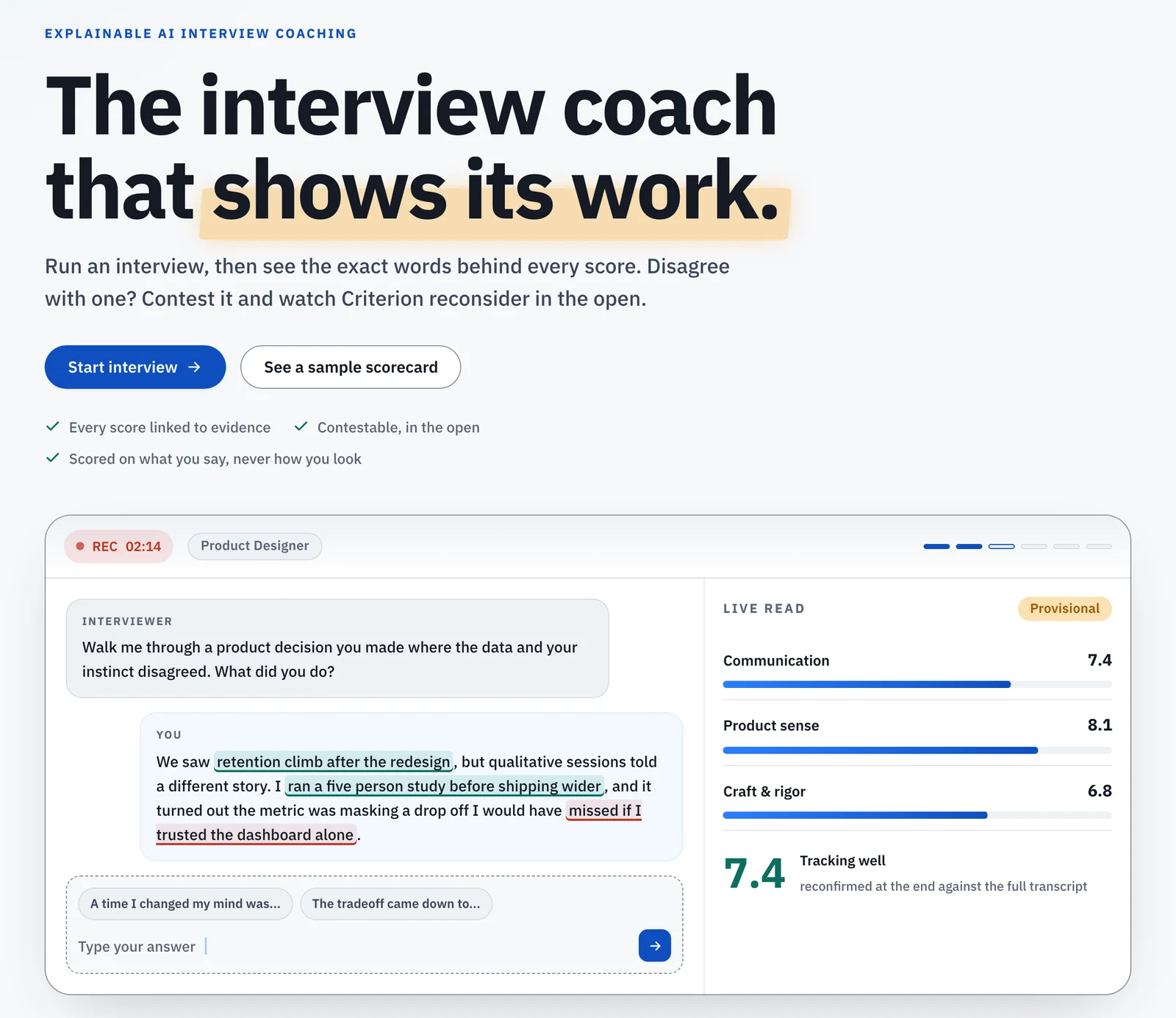
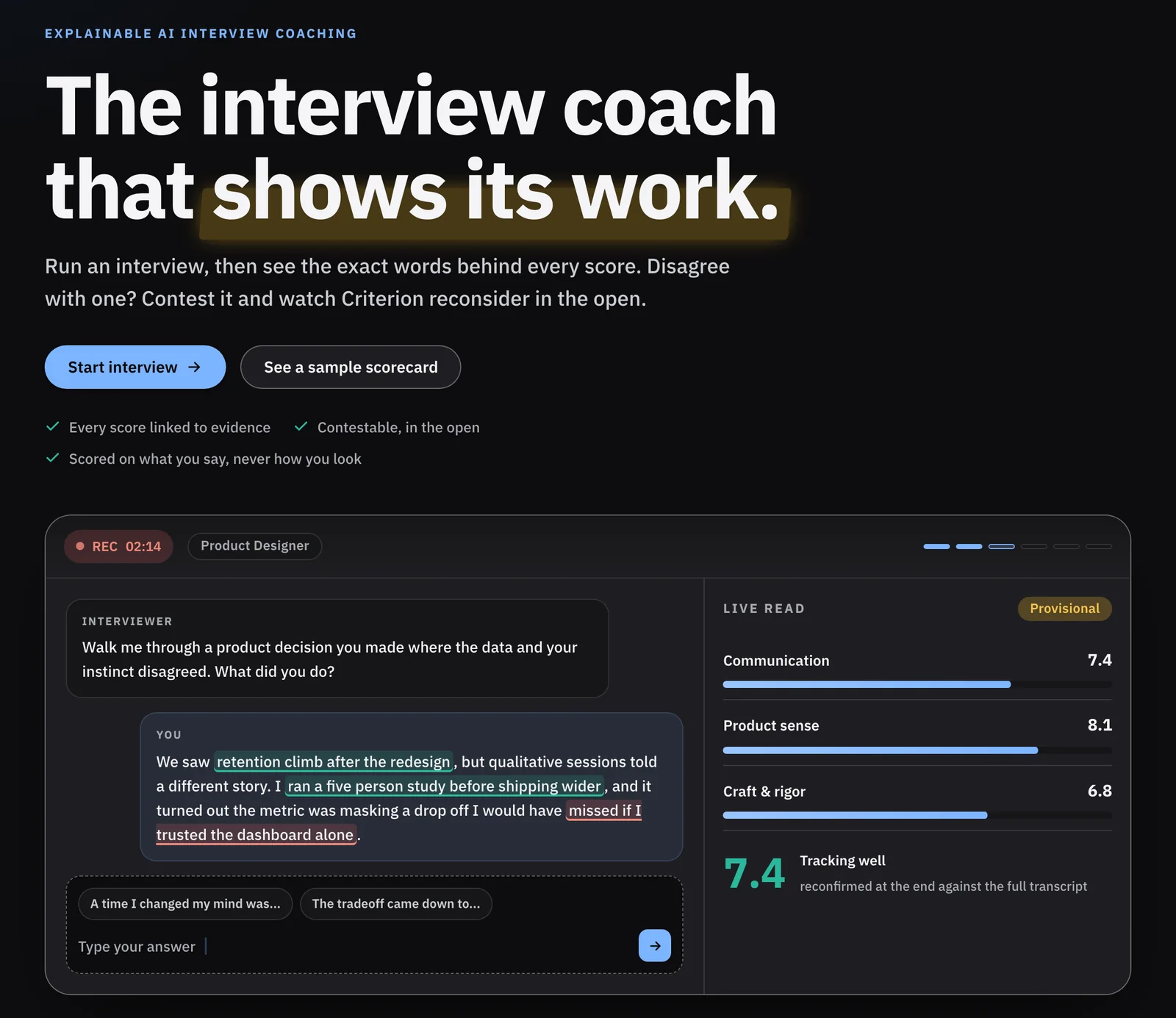
Criterion's landing page: the interview coach that shows its work, with the interview stage scoring an answer as it is given Criterion's landing page: the interview coach that shows its work, with the interview stage scoring an answer as it is given
Criterion live: the interview stage scores each answer as you give it

Criterion2/3What I did

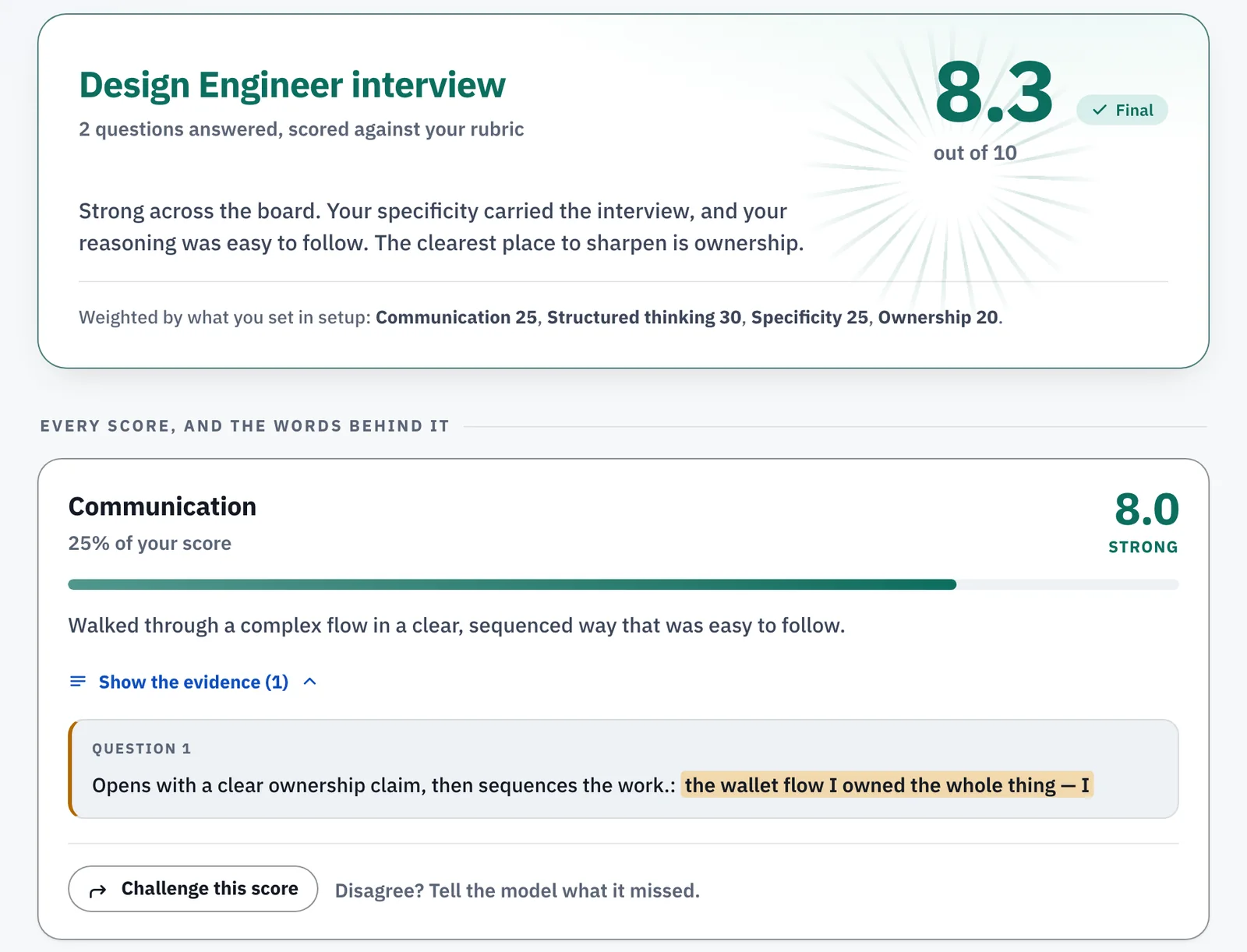
Every score links to the exact words that earned it, and you can challenge any of them.

  • Open a score to see the quote behind it, why it counted and when you said it.
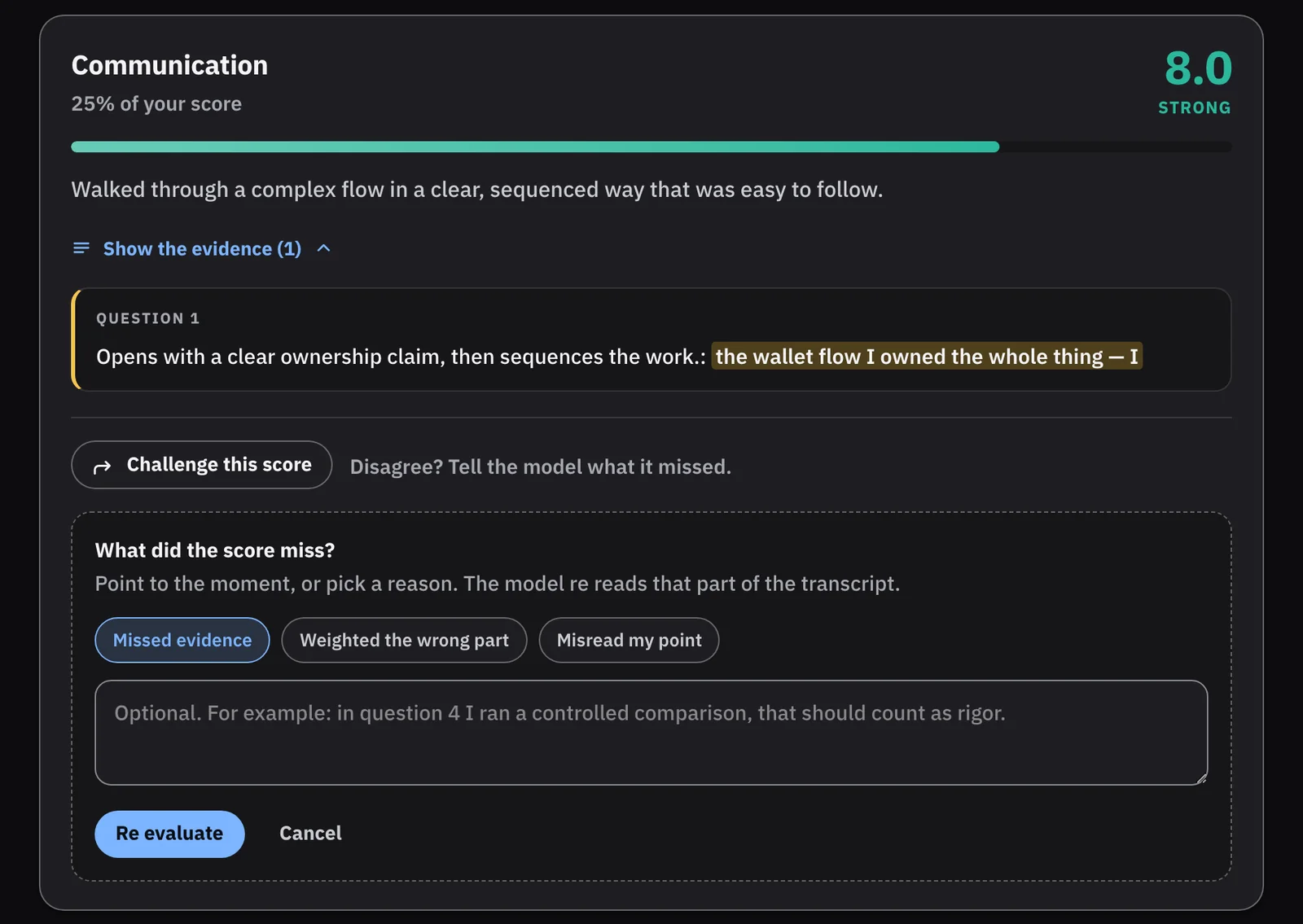
  • Challenge a score and the AI checks it again in front of you. It can raise it, hold it, lower it or hand it to a person.
  • Challenges are capped and the handoff to a person is always there, so it can't turn into haggling.
  • The debrief and the scores read from one set of evidence, so they can't disagree.
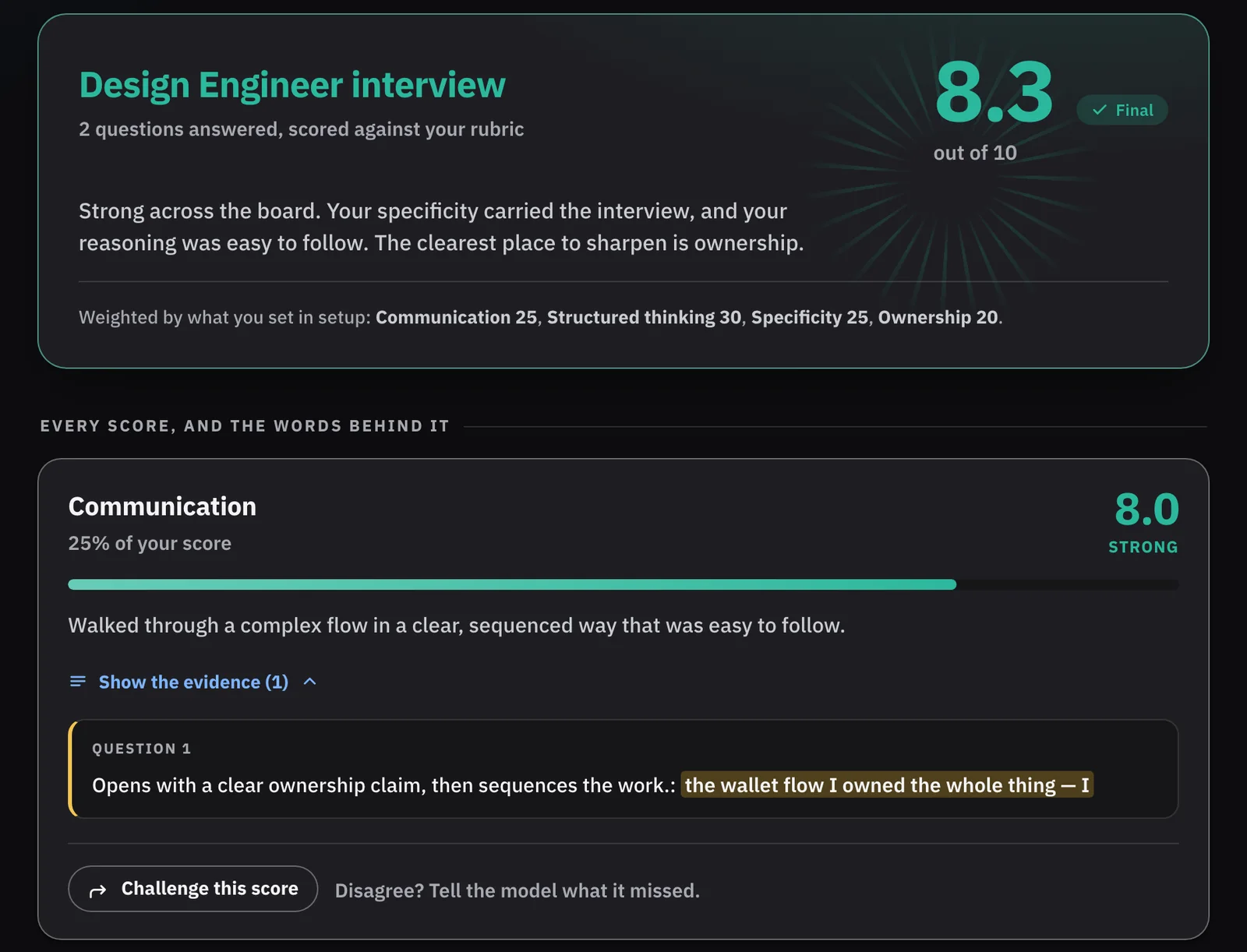
Criterion's scorecard: an 8.3 overall, and the Communication score opened to the exact words that earned it Criterion's scorecard: an 8.3 overall, and the Communication score opened to the exact words that earned it
Every score opens to the words that earned it

Criterion3/3What changed

No results yet. Criterion is live and early, and not tested with users.

Do people open the evidence?

On a real share of scores, not just the low ones.

Do challenges change scores for good reasons?

How often a score is raised, held, lowered or escalated, and why.

Do people act on the result?

Whether they change how they prepare, or save and share the Score Card.
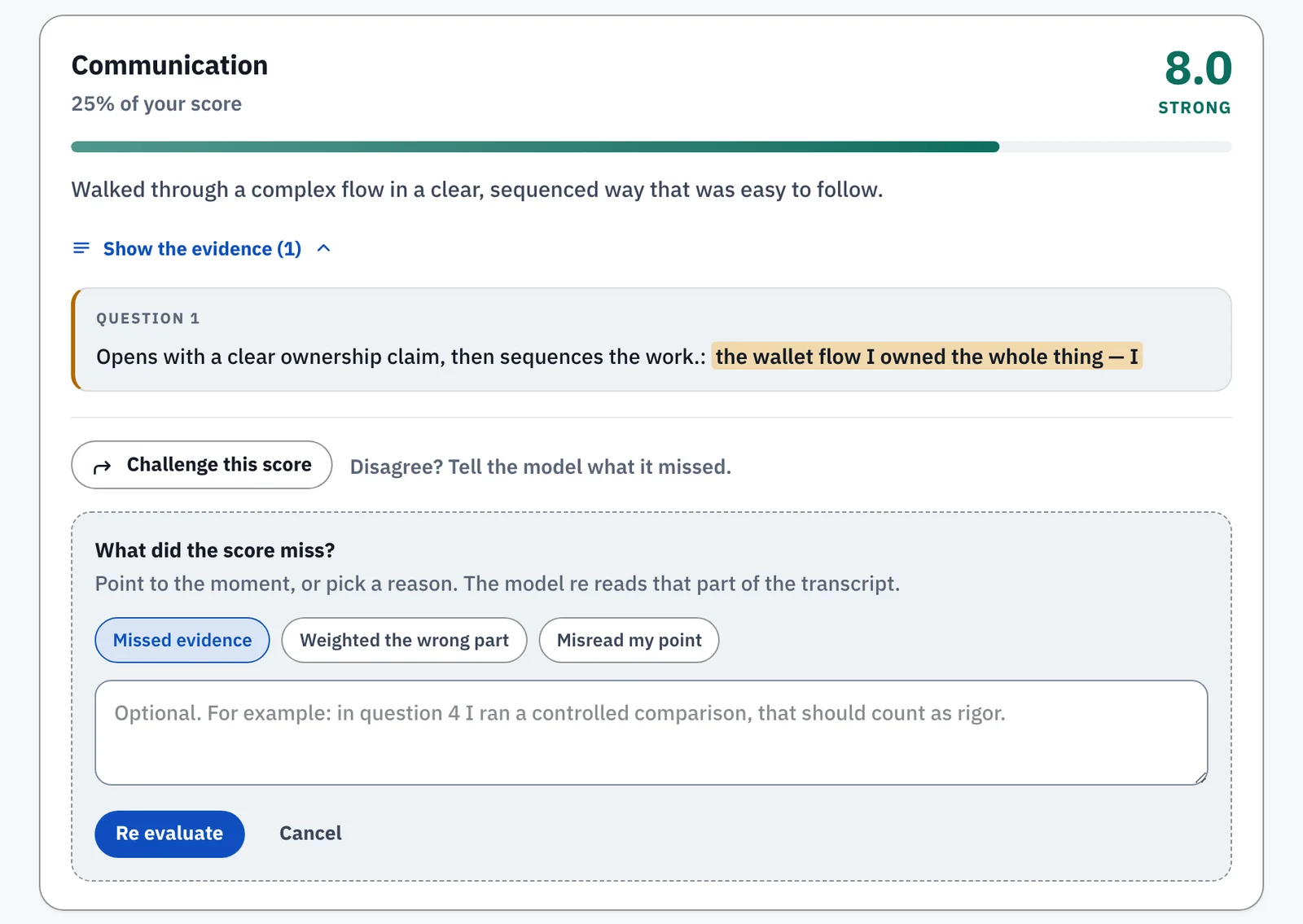
Criterion's challenge panel: the candidate picks Missed evidence, and the model will read that part of the transcript again Criterion's challenge panel: the candidate picks Missed evidence, and the model will read that part of the transcript again
Disagree with a score, and the AI reads that part again

Wolf-Rayet and Watchtower1/2The situation

Most design systems don't stop a screen from filling up with things fighting for your eye.

Role
My own design system. I designed and built it alone
Live
Published at r136.dev, with Watchtower as its live demo

"Use emphasis sparingly" breaks at the first deadline.
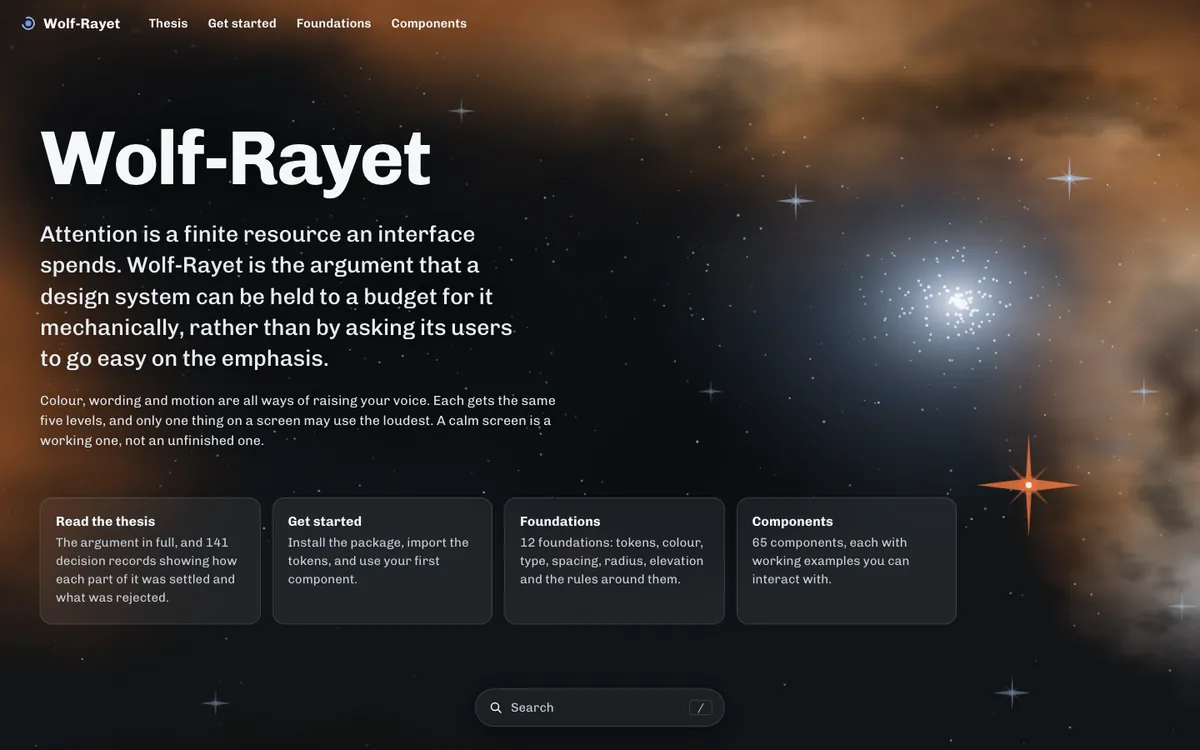
The Wolf-Rayet documentation site at r136.dev
Wolf-Rayet at r136.dev | Figma components

Wolf-Rayet and Watchtower2/2What I did

I built a design system with one rule. Only one thing on a screen may demand attention.

  • Color, wording and motion share the same five levels of emphasis.
  • Every build checks the rule automatically, so it holds without anyone policing it.

Tested on Watchtower: one person supervising AI voice agents on live calls.

Watchtower
One decision stands out, everything else stays calm

Yoo DaiStaying in Thailand as a foreigner1/3The situation

Foreigners in Thailand must know which visa fits, what the office wants, and the days left on their stamp.

Role
Design and the SwiftUI build
Runs on
iPhone, Apple Watch, the Home Screen and the Lock Screen
Live
yoodaiapp.com, free on the App Store

Miss a date and you overstay.

Days left on the stay

Yoo Dai2/3What I did

Ask, scan, compare, complete, track.

  • Passport read on the phone, never kept or sent.
  • Visas ranked, each with cost, documents and its official source.
  • A checklist to the immigration counter.
  • Not legal advice, and it says so.
The options, ranked
Office day

Yoo Dai3/3Trust, and how it earns

Everything that keeps you legal is free. A membership adds the full visa plan.

  • No account, no ads, no tracking. Data stays on the iPhone.
  • Days left on the Home Screen, Lock Screen and Watch.
  • Membership: $19.99 a year or $3.99 a month.
On the wrist
Home

KeySignThe offer at the property1/3The situation

Buyers decide right after a showing. The tools to write the offer needed a desk.

Role
Senior product designer at Anywhere
Team
My squad, with legal, compliance and brokerage operations
Status
Tested with five agents, on the Q3 2026 Denali roadmap
  • Deals cooled after the showingSome agents joked about signing in the driveway.
  • Offers needed a deskFour tools, back at the office.
Start at the property

KeySign2/3What I did

I took it from a finding to the roadmap, then designed the production version.

I demoed it to the VP of Product Design, and leadership put it on the Q3 2026 roadmap.

  • The property's state and county load the right forms.
  • Disclosures are built with the offer and checked before signing.
  • Every deadline is tracked.
Build the offer
Disclosures built with the offer

KeySign3/3What changed

Tested with five agents and put on the Q3 2026 roadmap.

What it gives agents

Nothing missed, nothing late, counter to escrow in one app.

What it gives brokers

Offers arrive complete, every disclosure signed on time.

Try the live prototype

Answer the counter
Carry it into escrow

DenaliThe end to end transaction1/3The situation

Agents ran every deal across three tools built for the back office.

Role
Product designer on the transaction, contract then full time
Team
My squad of developers, product managers and research, with legal, compliance and brokerage operations

"I'm juggling too many systems just to close one deal."

My part of Denali: the transaction, listing to closing.

My DealsBuilt for the back office
Transaction ManagerBuilt for the back office
TridentBuilt for the back office
DenaliOne mobile app, built for agents

Denali2/3What I did

I designed the transaction from end to end, from the first contact to closing.

A deal takes 46 days on average, and agents spend too much of it retyping.

  • Start a deal from anywhere.
  • Anything an agent enters is captured once, and every document fills in.
  • One home for the whole deal, and it suggests the next step.
Start a deal once
One home for the whole deal

Denali3/3What changed

Agents run the deal in one app, and brokers get complete files.

For agents

One app from listing to closing.

For brokers

Comments on the exact page. Files close complete.

Every step to closing
Broker review, on the exact page

BOSSThe broker operating system1/3The situation

Brokers run an office of agents, but their numbers lived in desktop reports.

Role
Product designer for goals, tracking and recruiting
Team
My squad of developers, product managers and research
Status
Goal setting and tracking shipped

Nothing on their phone helped set a goal, track the office or recruit.

The office on day one

BOSS2/3What I did

I designed goals, tracking and recruiting for brokers.

  • A suggested goal from the last 12 months.
  • Income, sides and volume by month.
  • Recruiting from MLS data.

Prototyped and tested with brokers before build.

A suggested goal, the broker decides
Income against the goal

BOSS3/3What changed

Goal setting and tracking shipped in BOSS.

For brokers

See who needs help before the year gets away.

For the business

Out of spreadsheets, into one app.

Who needs a check-in
Recruiting from MLS data

Property search2/3What I did

I made the case for one engine underneath, with each brand keeping its own look on top.

  • Type a sentence; the engine reads it as criteria.
  • Shared ranking, learning from all six brands.
  • Every home shows the points it earned, in plain words.
  • Fair Housing rules live once, in the shared engine, so no brand can forget them.

Working prototypes, not a slide.

corcoran.com/search
One sentence, read as four criteria

Property search3/3What changed

The case was made and the prototype worked. Then my role ended before the pilot.

How far it got

A one-brand pilot was planned. My role ended first.

What happened next

In January 2026 the six brands moved onto one shared platform, the direction I had designed.

For the business

One engine in place of six search teams, six data pipelines and six vendor contracts.

One engine, six brands
One engine, six brands, the same results

Let's talk

What I'd bring to your team

AI people can check

What the AI may do on its own, the evidence behind each result, and when a person approves. Allowance, Watchtower and Criterion.

I ship what I design

Say When and Yoo Dai are on the App Store. Four more are live on the web.

Results at scale

Anywhere: lead intent conversion up 8 to 12%, agent task time down 15 to 25%. Verint: admin setup time down 30%.

All pages

    What I do best, 2 of 5

    Anywhere Real Estate, KeySign

    I take an idea from a finding to the roadmap

    From the first finding to the roadmap and into build. KeySign went from a research finding to the Q3 2026 roadmap.

    The situation

    I was on the product design team at Anywhere, auditing the flows of Denali, a new app for agents. In interviews and research, agents kept telling me deals lost momentum after the showing. Some joked they wished they could sign the deal in the driveway.

    What I did

    I took the finding and my early ideas to the UX team and used their feedback to narrow the direction. I then demoed it to the VP of Product Design, who took it to leadership, and it went on the Q3 2026 roadmap as part of Denali.

    The hard part was the rules. Forms, disclosures and deadlines change from state to state, and I made sure every one was handled inside the flow and on time.

    I designed the production version with my squad and partners in legal, compliance and brokerage operations. It went through our design reviews for UX, copy, accessibility and the design system, and through demos with leadership, brokerages and agents.

    I pulled all the feedback into one list and ranked it with my squad: fix before launch, fix in the next release, or leave out. Leadership saw the list at every demo, so there were no surprises when it went to build.

    What changed

    KeySign was tested with five agents at several stages of the build and added to the Q3 2026 Denali roadmap. It wasn't released to production while I was there.

    It is built so agents write and sign a complete, compliant offer at the property, and brokers get offers that arrive complete, with every disclosure signed on time.

    Read the KeySign case study

    What I do best, 5 of 5

    Anywhere Real Estate, Denali

    I own a flow from the first sketch to QA

    Engineering, product, research, legal and leadership, from first sketch through QA.

    The situation

    Agents ran their deals across three back office tools that confused them. Denali was the new agent app that would replace them, and I designed the transaction with my squad.

    What I did

    A transaction touches a lot of people. I worked every day with my squad of developers, product managers and researchers. I brought in legal, compliance and brokerage operations early, so their rules shaped the design from the start.

    When I had a question, I found the person who owned the answer. When nobody knew, or I got conflicting answers, I ran a quick discovery session, found out myself and shared it with the team.

    What changed

    Agents got one app to take a deal from the first contact to closing.

    Brokers got complete, compliant files and a clear view of every deal in the office, without chasing agents for paperwork.

    What I do best, 3 of 5

    Anywhere Real Estate, BOSS

    I test ideas early, then build them for real

    I find the job people hire a product to do, test it in code, and ship working apps.

    The situation

    BOSS is a mobile app for brokers. They wanted to set yearly business goals and track their office against them. Nobody knew yet what a useful goal looked like on a phone.

    What I did

    I built clickable prototypes of goal setting and goal tracking and put them in front of brokers before anything was built. What we learned decided what went to development and what was cut.

    What changed

    Goal setting and tracking shipped in BOSS. A broker can see commission income against goal for the office and for each agent, and spot who needs help before the year gets away.

    What I do best, 4 of 5

    Anywhere Real Estate, Denali and BOSS

    I build design systems teams can run on

    Figma files, tokens and components, and moving products from one system to the next, plus Kinetic, a system I built on my own.

    The situation

    On Denali and BOSS, developers kept asking which screens were final. Big files get messy fast, and a design system only helps if people can find what they need.

    What I did

    I set up every file the same way. Status goes in the page and layer names, so anyone can see what's approved. Each thing has one official version, and new work goes in branches. Token names match the code, so color/bg/surface in Figma is --color-bg-surface in CSS.

    I've also moved live products from one design system to another. I map each old component to its new one, move screens over in stages so product work keeps going, and retire old pieces once nothing uses them.

    Storybook and tokens

    I set up tokens in three layers: raw values, what they mean, and the components that use them. A new theme is then a change in one place. I document components in Storybook with every state, so designers and developers see the same thing.

    On my own time I built Kinetic, a design system for a banking app with 119 tokens, and then built Allowance, a business banking app, on top of it.

    What changed

    Developers built from the approved page and stopped asking. Reviews went faster because everyone knew where to look.

    Read my Figma playbook

    What I do best, 1 of 5

    Everyday work and my Prompt Library

    I design AI people can check and correct

    Watchtower, Criterion and my AI Design Lab, plus a Prompt Library of the prompts that work.

    The situation

    I use AI every day: to learn a codebase, plan a change, build a prototype and check my own work. The prompt decides whether I get something useful or something I have to redo.

    What I did

    I work with AI in three steps.

    • Steer. Before it writes anything, I tell it the goal, who it's for, and what it must not guess.
    • Ground. I point it at real material and ask where every claim came from, so nothing is made up.
    • Oversee. I limit what it can touch, ask for a plan first, and check its work before I use it.

    The prompts that worked, I kept. They're now my Prompt Library: 25 prompts in the order design work happens, from questioning the request to writing the handoff notes. Each one starts from the same project brief and says what a good answer looks like and what to check before using it.

    Here's one I use after user interviews:

    Make sense of your interview notes
    Here are notes from [number] interviews: [paste]. Group what people said into four forces: what pushed them away from the old way, what pulled them toward the new one, what worried them about switching, and what habits kept them where they were. Quote the notes for each point and say how many interviews it came from. Put anything that came up only once in a separate list.
    
    A good answer
    Quotes you can trace back to a person, with a count beside each point.
    
    Before you use it
    Check three quotes against your notes. If one is reworded or made up, don't trust the rest.

    The four forces steer it. Asking for quotes and counts grounds it in what people actually said. The check at the end is how I oversee it.

    What changed

    I get usable work on the first or second try. And because the prompts are written down, anyone on the team can use them and get the same quality, not just me.

    Browse the Prompt Library

    See Steer, Ground and Oversee in my AI Design Lab